Benefits
More security, more control, and better together
Plans and options
More security, more control, and better together
Features
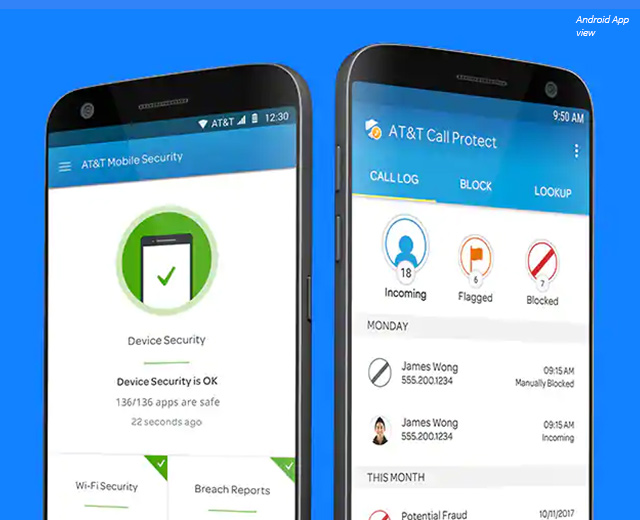
AT&T Mobile Security and Call Protect
AT&T Mobile Security features |
Basic - Free |
Plus - $3.99/mo.2 |
|---|---|---|
Device security |
Yes | Yes |
Breach reports |
Yes | Yes |
Secure Wi-Fi VPN |
Yes | |
Wi-Fi alerts |
Yes | |
Theft alerts for Android |
Yes |
AT&T Call Protect features |
Basic - Free |
Plus - $3.99/mo.2 |
|---|---|---|
Automatic fraud blocking |
Yes | Yes |
Suspected spam warning |
Yes | Yes |
Personal block list |
Yes | Yes |
Enhanced caller ID |
Yes | |
Reverse number lookup |
Yes | |
Custom call controls |
Yes | |
Manual call blocking |
Yes |
Resources
FAQ
There are several ways:
- Sign into Premier (wireless.att.com/business) and on the "manage" tab, under "I want to" select, under Plans & Features, select "Change features." Then, uncheck "Mobile Security and Call Protect Basic Biz"
- Sign into myAT&T and select Opt out of Mobile Security and Call Protect.
- Contact your AT&T sales rep
Two free mobile apps that help reduce your chances of becoming a victim of fraud.
AT&T Mobile Security:
- Helps ensure your device is secure and protected.
- Provides important alerts about security updates for your device (iOS)
- Scans your device to warn you about potentially unsafe apps/files (Android)
AT&T Call Protect:
- Let’s you take more control over nuisance calls
- Detects and blocks calls from likely fraudsters.
- Alerts you of telemarketers and other suspected spam calls.*
- Enables you to add unwanted calls to your personal block list.
*Available in HQ Voice coverage area
This is a premium subscription service that costs $3.99/month and provides additional features in both AT&T Mobile Security and AT&T Call Protect for the ultimate control.
AT&T Mobile Security PLUS:
- Secure Wi-Fi® VPN helps protect your data over open (unencrypted) Wi-Fi connections
- Wi-Fi Alerts: Protect your privacy. Receive alerts when a Wi-Fi network you join may be dangerous (available only on Android smartphones)
- Breach Reports alert you about important data breaches along with helpful tips (Basic on Android)
- Theft Alerts notify you via email if suspicious activity is detected on your phone (available only on Android smartphones)
AT&T Call Protect PLUS:
- Enhanced Caller ID identifies unknown caller details4
- Reverse Number Lookup lets you enter a U.S. number to get caller details
- Custom Call Controls give you the control to allow, send to voicemail, or block calls by entire categories
4Available in HD Voice coverage area
The basic version of AT&T Mobile Security and Call Protect is free5 to eligible AT&T wireless customers.
PLUS features of both AT&T Mobile Security and Call Protect is $3.99 per month. Learn more about PLUS feature (see the FAQ for: What is AT&T Mobile Security and Call Protect). Features vary by device type.
5Data rates may apply for app download and usage.
Download each app from the Apple App Store or Google Play.
Download on the App Store | Get it on Google Play
You can add the PLUS features in one of three ways:
- Add the PLUS features via myATT
- From within the AT&T Mobile Security app.
- From within the AT&T Call Protect app.
PLUS features of both AT&T Mobile Security and Call Protect is $3.99 per month. Features vary by device type.
AT&T Mobile Security scans the apps and operating system on your device and notifies you if certain threats are detected. If an unsafe app or file is found while an app is being installed, during a security scan, or while actively monitoring file systems, the Security tab on the dashboard will turn red until you take action.
Note: Apps and files are not automatically deleted when threats are detected. You are responsible for taking appropriate action to remove or remediate any detected threats.
System Advisor confirms that your operating system contains the latest operating system software updates. The System Advisor feature will detect if your device has been rooted,6 which makes it vulnerable to security threats.
6Not guaranteed to detect all roots and does not prevent roots, or unauthorized app installation(s).
Secure Wi-Fi® VPN helps protect your data when you are using an open (unencrypted) Wi-Fi connection.
Open (unencrypted) Wi-Fi connections may exist in restaurants, hotels, airports, etc. The Secure Wi-Fi VPN creates a tunnel for your data when you are using open Wi-Fi hotspots to protect you from Wi-Fi snooping during important tasks like email, financial transactions, and browsing the web.
Secure Wi-Fi VPN only works in the United States, including Puerto Rico, Hawaii, and the U.S. Virgin Islands. It does not work when using certain video streaming apps. For a complete list see the AT&T Mobile Security Terms and Conditions.
It means your data connection is not encoded. Unencrypted data sent over the internet can be intercepted by hackers.
Your home Wi-Fi and Wi-Fi at your work location are most likely encrypted. Secure Wi-Fi VPN will not deploy on these connections. Secure Wi-Fi VPN will not deploy on already secure connections.
- An automatic popup message tells you when the VPN has connected.
- Indicators on your device home screen.
- A VPN indicator on iPhones; note the VPN indicator is not always available on the home screen of the iPhone X, but can be seen when you swipe down for Control Center.
- A key on Android smartphones
- An indicator on the AT&T Mobile Security app home screen
Secure VPN will disconnect automatically when you leave open Wi-Fi networks.
If you have more than one VPN tool/feature on your device, Secure W-Fi VPN will not activate if another VPN is already in use. Conversely, if you manually activate another VPN service, Secure Wi-Fi VPN will deactivate and allow the third-party VPN feature to turn on.
Some Wi-Fi hotspots require you to log in to a portal before you can access the Wi-Fi hotspot. If you are having issues getting the Wi-Fi hotspot to connect, try to open a browser and type in the name of the business (for example, https://starbucks.com) to try to trigger the portal. If that doesn’t work, try something like www. Google.com to force it to open so you can connect to the Wi-Fi hotspot.
Due to restrictions by some video streaming services, video streaming data may be directed outside of the Secure Wi-Fi VPN service while all other traffic will continue through the encrypted VPN tunnel.
Secure Wi-Fi VPN is provided on an “as-is” basis with no warranties and makes no representations of any kind, express or implied, with respect to the Secure Wi-Fi VPN.
As an additional layer of protection on Android devices, a feature called Wi-Fi Alerts is available for PLUS customers to send you a notification if a Wi-Fi hotspot you are trying to join is potentially unsafe and could hurt your privacy.
Theft Alerts warn you when suspicious activity is detected on your Android smartphone, indicating your smartphone may have been stolen. You will be provided instructions on what to do if your device is lost or stolen.
Alert triggers are customizable by:
- Multiple failed passcode attempts in a row
- Your SIM card has been removed or replaced
- Airplane Mode has been enabled
- Your device has been powered off
Once the alert is triggered, an email will be sent including the location of your device and how to suspend service. For Android smartphones, a photo taken using the front-facing camera is included in the message.
Please note: Theft Alerts is not available on iOS.
Millions of U.S. consumers have had their personal information compromised in data breaches. With Breach Reports, you will receive timely information on data breaches by looking at the apps on your device to provide information. If a company is breached:
- You can manage businesses you receive breach reports for
- You will be notified if a company is breached via in app notifications or by email.
As part of the System Update feature, you will be notified if your Operating System is out of date and prompted to update it now.
Updating your operating system is an important security feature for your mobile phone. The software updates sometimes contain important fixes to security flaws and system vulnerabilities. This could prevent your phone from being hacked and prevent your data from being shared unwillingly.
The passcode check feature will ensure you have a passcode set up correctly to keep your device and data secure.
The most important thing you can do to keep your device and data secure is lock the device with a unique PIN or a biometric fingerprint.
You may block up to 200 numbers manually.
There is no limit to the amount of numbers you can add to your Personal Block list.
Yes! You may view the list of calls blocked by AT&T Call Protect within the AT&T Call Protect app.
- Click on the ‘Block’ tab within the app
- Click the ‘+’ or Add menu option then choose ‘Select from Call Log’
- On the ‘Select from Call Log’ screen, select the Private Caller (Unlisted) call entry
- Tap Block
Legal
1AT&T Mobile Security & Call Protect: Service includes access to AT&T Mobile Security and AT&T Call Protect. Requires download of separate apps. AT&T Mobile Security: When Mobile Security app is installed, Call Protect features like Automatic Fraud Blocking and Spam Risk Alerts will be enabled. App Monitor: AT&T Mobile Security is not guaranteed to detect or protect against all viruses, malware, rooting, and unauthorized app installations, or to prevent data breaches or device theft. AT&T Call Protect: Automatic Fraud Blocking may inadvertently block wanted calls. Settings can be adjusted in the app. Spam Risk Alerts: Must be in an AT&T HD Voice coverage area. Suspected spam may include service messages and/or other permitted calls.
2AT&T Mobile Security & Call Protect Plus: Subscribers pay $3.99 per month. Business customers may activate or cancel the Plus service through AT&T Premier, MyATT or their AT&T Sales Representative. AT&T Mobile Security—Secure Wi-Fi VPN: Automatically enabled only when your device joins an open (unencrypted) Wi-Fi network. Does not work when using certain video streaming apps. Not available while roaming internationally. Personal ID Monitor: May not detect all compromises or leaks of your personal data. Safe Browsing (Android): May not detect all suspicious websites. Requires activation of VPN and notifications to be enabled. AT&T Call Protect—Custom Call Controls: All call categories, except Fraud, are automatically set to allow. Manage all settings via app. Enhanced Caller ID: Must be in AT&T HD Voice coverage area to be alerted to caller name and location. Reverse Number Lookup: Limited to 200 queries per user within 24-hour period.
Eligibility: Available for business postpaid wireless accounts with eligible service. Device requirements: Compatible device is required and includes iPhone 6 or newer, running iOS v9.3+ and AT&T HD Voice-enabled Android smartphones. Some features vary by device operating system. Phones sold by other carriers or direct from device manufacturers may not be eligible for AT&T Call Protect. Rates: Include access to both services but require download of separate apps. Data charges may apply for app download and usage. Other charges and restrictions may apply.
See complete AT&T Mobile Security and AT&T Call Protect terms for more info.
Speak to a sales rep
Your feedback will help us to improve AT&T Business so you continue to have a great experience when visiting us!
This survey is conducted by an independent company ForeSee for AT&T.